Creator Program:Earn $3 per subscriber you refer.Fast payouts, instant approval.
CS2 Thumbnail Maker

CS2
Thumbnail Maker.
Clutch Ready.

From Premier rank-ups to faceit 1v5 clutches, this CS2 thumbnail maker generates clean Counter-Strike 2 YouTube thumbnails for clutches, smoke lineups, and map guide videos in under a minute. Make CS2 thumbnails for Premier, faceit, and clutch videosBuilt for smoke lineups, map guides, and frag highlights

Creator
Creator
Creator
Creator
Creator
27k+

Trusted by 27k+ creators

Thumbnail Example

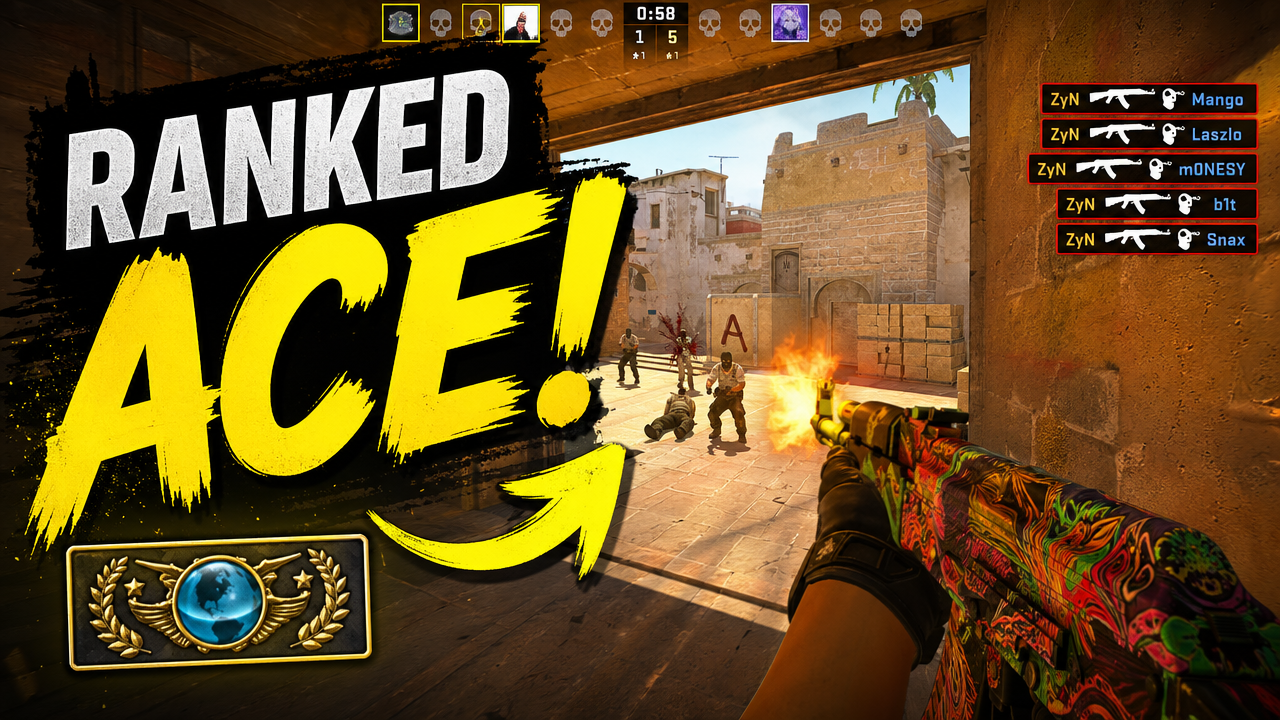
CS2 thumbnail example

See the kind of clear, high-contrast YouTube thumbnail VisualKit can create for CS2 videos.

CS2 thumbnail maker example for a Premier 1v5 clutch video
CS2 Workflow

Your Complete CS2Thumbnail Pipeline

Use VisualKit's free cs2 thumbnail maker to make cs2 YouTube thumbnails that actually get clicked — no Photoshop, Canva, or design experience needed.

1STEP 1: CREATE

1. Describe your CS2 video

Type your video idea — for example, a hardcore run, a ranked win, or a new CS2 guide. The AI uses your prompt to generate cs2 thumbnail ideas in seconds.

Target cs2 thumbnails
Generate YouTube-ready 1280x720 options
Start from a clear title, hook, or video idea
Create
Prompt
Premier: 1v5 clutch — map highlight.
Pick your favorite16:9 · YouTube
Each option gets a score for how likely it is to get clicked.
2STEP 2: REMIX

2. Compare multiple thumbnail options

Get several finished cs2 thumbnails to compare side by side, then pick the one with the strongest hook for your channel.

Adapt for Clutch and Highlight Videos
Adapt for Premier and Faceit Content
Keep the thumbnail readable on mobile
Remix
youtube.com/watch?v=dQw4w9W...
Original
Original thumbnail style reference
RecreatedAI
Recreated version matches style
Detected style
Bold TextDark BGClose-upHigh Contrast
3STEP 3: IMPROVE

3. Download and upload to YouTube

Export your thumbnail at 1280x720 (YouTube's recommended size) and upload it directly — or run a YouTube A/B test with multiple variations.

Adapt for Smoke Lineups and Map Guides
Cover cs2 thumbnail maker intent
Download and upload without manual resizing
Improve
Edit
Make the vest blue, replace taco with hamburger
Drag to compare
After improvements resolved
Original thumbnail baseline draft
Before
After
Vest color -> blueTaco -> hamburgerContrast +18%
The Problem

Great videos, wrong packaging

Your content is solid. But a forgettable thumbnail means nobody clicks. Here's what's silently killing your channel's growth.

8:42
212K views · 2 days ago
Yours
112 views · 2 days ago
Skipped
12:06
301K views · 5 hours ago
01 · Visibility

Invisible in the feed

Your thumbnail blends in, so attention lands everywhere except your video.

DDesigner
Hour 31
Can we make the title pop?
thumb_v2.psd2.4 MB
Closer — try a different crop?
thumb_v3_FINAL.psd2.4 MB
02 · Speed

48 hours for one image

Briefs, files, revisions — and you end up back at version one.

Last upload
CTR
Avg. views
A/B winner
No click data
03 · Data

Uploading blind

No click data, no A/B tests. Every upload is a guess.

VisualKit fixes all three

One workflow for thumbnails people actually notice.

01Visibility
IgnoredChosen in the feed
02Speed
48+ hours30 seconds
03Data
GuessingClick signals
Start for free
Why CS2 Creators Choose VisualKit

Make CS2 videosimpossible to ignore.

Free CS2 thumbnail maker for Premier, faceit, clutches, smoke lineups, and map guides. Generate clean 1280x720 Counter-Strike 2 YouTube thumbnails in under a minute.

01

Built for CS2 Creators

Every layout is tuned for CS2 thumbnails — Premier matches, faceit, 1vX clutches, smoke lineups, and map guides — using framing real Counter-Strike channels use to drive CTR.

02

Fast Tactical Hook

Each CS2 thumbnail is built so a viewer scrolling YouTube understands the clutch, the rank-up, or the lineup result in a single second.

03

Mobile-First Readability

Your CS2 YouTube thumbnails are checked for readable text and clean focal points on phone-sized previews where most YouTube viewing now lives.

04

Multiple AI Variations

Generate several CS2 thumbnail ideas from one prompt — clutch, Premier, faceit, or lineup — and either pick the strongest hook or run a YouTube A/B test.

05

Clutch and Highlight Videos

Create CS2 thumbnails for 1vX clutch rounds, ace highlights, faceit fragmovies, and full-match compilations.

06

Premier and Faceit Content

Make CS2 thumbnails for Premier rank-ups, faceit climbs, ESEA placements, and competitive match recaps.

07

Smoke Lineups and Map Guides

Design CS2 thumbnails for smoke lineups, util executes, map control breakdowns, and CT and T-side strategy videos.

08

Clutch and Ace Thumbnails

Create CS2 thumbnails for 1v5 clutches, ace rounds, and frag highlights with bold scoreline hooks, round context, and a clear focal player.

09

Premier and Faceit Thumbnails

Make CS2 thumbnails for Premier rank-ups, faceit climbs, and ranked match recaps with clean rank callouts and result-first copy.

More Game Thumbnail Makers

Build thumbnails across stronger gaming niches

Use dedicated landing pages for each game instead of forcing every search into one broad gaming page.

Choose your plan

Simple Pricing

Join 25,000+ creators making thumbnails that get clicks.

Starter

$20/mo

For creators posting 1–4 videos a month.

Includes:

  • Up to 40 thumbnails / month
  • Templates from top creators in your niche
Most Popular

Pro

$40/mo

For creators posting weekly and ready to grow.

Everything in Starter, plus:

  • Up to 100 thumbnails / month
  • Never miss a publish day

Ultra

🚀
$80/mo

For high-volume creators publishing multiple times a week.

Everything in Starter, plus:

  • Up to 250 thumbnails / month
  • Lowest cost per thumbnail for daily publishing

All plans include thumbnails, social content, app icons & logo creation.

Secure payment via LemonSqueezy. VAT calculated at checkout.

CS2 Thumbnail FAQ

CS2 Thumbnail Questions

Type your CS2 video idea — like a Premier 1v5 clutch or an Anubis smoke lineup — and the AI generates several finished CS2 thumbnails in under a minute. Pick your favorite and download at 1280x720 for YouTube.
Yes — the clutch style is built around scoreline hooks and a focal player, while the Premier style focuses on rank-ups and match results. Both work for faceit climbs, ESEA placements, and tournament recaps.
Yes — smoke lineups and map guides are a first-class style. Generate CS2 thumbnails for util executes, smoke lineups, and map control videos with clear map tags and labeled utility callouts.
CS2 YouTube thumbnails should be 1280x720 pixels (16:9), which is YouTube's recommended size. Every export from this CS2 thumbnail maker uses that exact resolution so your thumbnails stay sharp on every device.
No — this Counter-Strike 2 thumbnail maker is built for creators, not designers. Type your video idea in plain English and the AI handles layout, text, color, and player framing, so you never need Photoshop or Canva.
Yes — each prompt returns multiple CS2 thumbnail variations so you can compare hooks side-by-side. Pick the strongest version or upload several to run a YouTube A/B test and let YouTube show which thumbnail wins.
Yes — VisualKit has a free tier so you can start making cs2 YouTube thumbnails right away. Paid plans add more monthly generations, HD downloads, and additional styles for full-time creators.
VisualKit is built specifically for cs2 creators — not a generic image editor. It generates finished cs2 thumbnails in under 60 seconds, exports them at YouTube's recommended 1280x720 size, and includes layouts proven to drive click-through on phones and desktop.
Strong thumbnails are the #1 driver of click-through rate on YouTube. Use one clear subject, short bold text (2–4 words), and high-contrast colors. VisualKit's cs2 thumbnail maker handles all three automatically, and lets you generate multiple variations so you can A/B test which one wins.
Start with the video hook, generate several cs2 thumbnail layouts, choose the clearest option, then export at 1280x720 for YouTube.
Yes. Generate a strong cs2 thumbnail, keep the layout direction, and reuse that structure across similar uploads so your channel stays consistent.
Yes. Use the generated variations to compare hooks, colors, crops, and text before you publish the video.